Understanding whether your property is affected by landslide risk is an important first step in any development project. In Auckland, the easiest way to check this is by using Auckland Council GeoMaps — a free online mapping tool provided by Auckland Council.
This guide walks you through the basics. Please remember though the maps are based on high level modelling- you may need to also engage a specialist to assess your specific site and development. Landslide risk is important to understand for development in general, but also in terms of requirements of the Auckland Unitary Plan (AUP), Proposed Plan Change 120 (PC120) and resource consent requirements.
Background
In assessing the susceptibility of the region to landslides, Auckland Council has mapped two key types of landslide susceptibilities viewable through GeoMaps:
1.Shallow landslide susceptibility and debris flows:‘
Shallow landslides’ are typically small, slope-scale failures within the shallow near-surface soil and rock materials where the proportion of the affected area of slope is small. They typically occur where steep slopes, concentration of overland flow paths, and accumulations of soil or weak bedrock combine to cause failure of the surficial materials, often triggered by prolonged and/or intense rainfall events.
2.Large-scale landslide susceptibility:‘
Large-scale landslides’ are geomorphic features that generally span over most of or the whole of a hillslope and are typically thousands or hundreds of thousands of square metres in area. They are related to deeper geological structures and groundwater conditions, and other longer-term landscape-scale processes.
GeoMaps has also mapped some existing and historic landslides/slips in the region, and these identified hazards may also affect the need for further geotechnical assessment and/or resource consent if they are on or in proximity to a site where works or development (e.g. construction, earthworks, subdivision) are proposed.
You can read more on the implications of the landslide mapping, including potential resource consent triggers, in our blog here.
How to guide – GeoMaps Landslide Hazard
Step 1:
- Open GeoMaps;
- Open the ‘Natural Hazards’ Layer (see image below).
Note: You can also type in an address in the address search bar first.
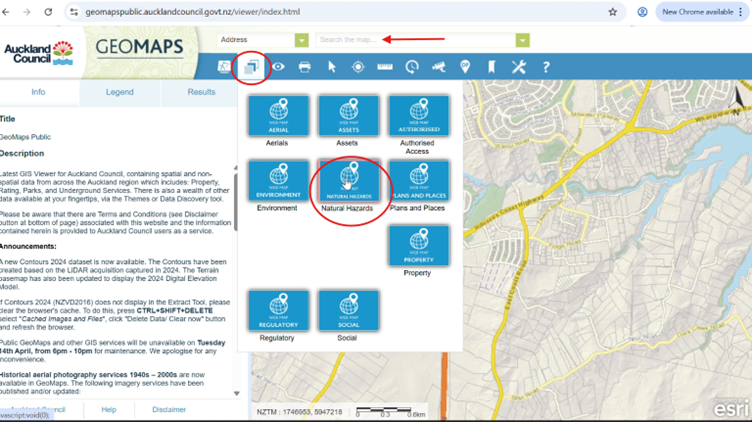
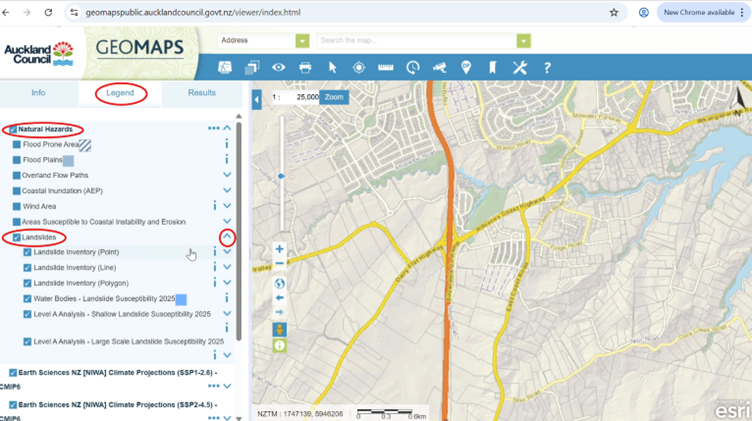
Step 2:
- Click on the “Legend” tab,
- Select the “Natural Hazards” checkbox,
- Select the ‘Landslides’ checkbox,
- Click the drop-down arrow to the right of the ‘Landslides’ box. This is shown in the image below.
Step 3:
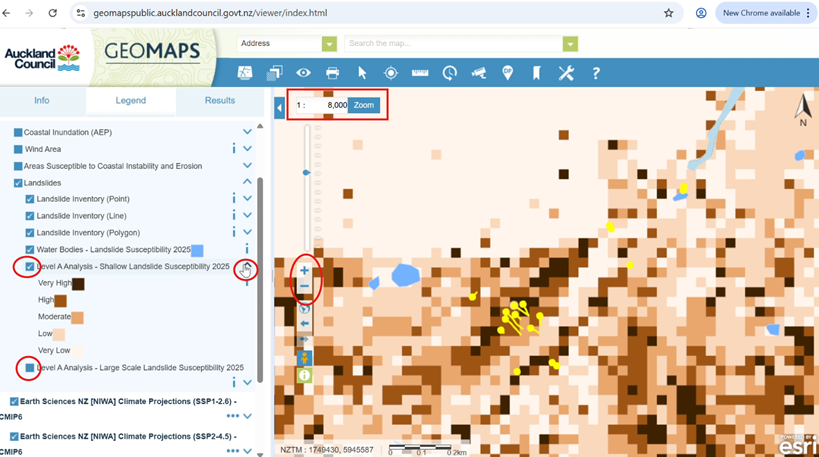
- Zoom to a scale of 1:8000 or more. This is because the landslide mapping layers are not visible at scales less than 1:8000.
A: Viewing the Shallow landslide susceptibility layer:
- Unselect the ‘Large Scale’ layer and select the ‘Shallow Scale’ layer.
This is shown in the figure below. You need to do this because only one landslide susceptibility layer is visible at any one time.
- Click the dropdown arrow for the ‘Shallow’ layer to see the Key.
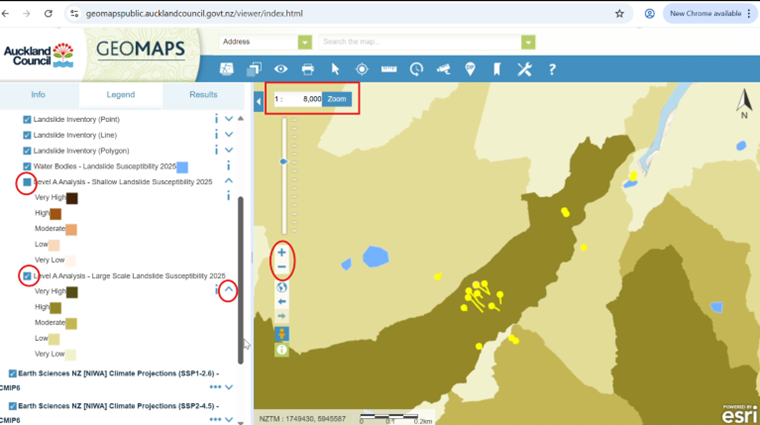
B. Viewing the Large-scale landslide susceptibility layer:
- Unselect the ‘Shallow Scale’ layer and select the ‘Large Scale’ layer.
This is shown in the figure below. You need to do this because only one landslide susceptibility layer is visible at any one time.
- Click the dropdown arrow for the ‘Large Scale’ layer to see the Key.
C. Viewing existing/historic mapped landslides
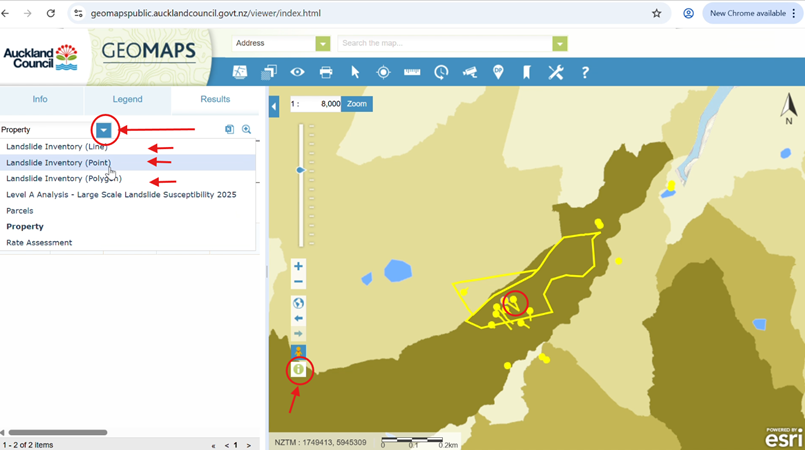
- Select the (i) information button.
- Click on a yellow point/polygon/line (these are mapped landslides).
- Click on the Property dropdown arrow and select from the Landslide inventory options (line/point/polygon) for more information on the mapped landslide/s. These steps are shown in the images below.
Here is a video that guides you through the process.
Interested in flood hazards?
If you think your site may be at affected by flood hazards, you can find out more in our blogs here and here.
Need help?
GeoMaps is a great starting point, but it is only a screening tool. If you’re unsure how landslides affect your property or development plans, it’s best to seek advice early. A planner can help interpret the mapping and identify the next steps.
Please don’t hesitate to get in touch with us at Planning Plus to discuss your development project and resource consent process. We can assist with interpreting flood hazard constraints, coordinating specialist input, and guiding you through the resource consent process.
You can contact us on hello@planningplus.co.nz or (09) 427 9966.

Achini is an Intermediate Planner at Planning Plus®. and has 5 years of experience in resource consenting. She has processed a variety of consents including residential, commercial, subdivision, air discharge, and soil contamination consents.
Achini holds a hold a Bachelor’s of Urban Planning (Honours) from the University of Auckland and is an Intermediate Member of the New Zealand Planning Institute. Achini previously served as the Emerging Planners representative for the Top of the South region.